Skip To Content
FleetFusionPlatform Login

Platform Structure

Your Organization. Connected.

Cost centers, depots and fleets give your people the right operational context. Vehicle, driver and asset types determine the requirements that apply to each record.

People, Permissions & Records

Built Around The Way You Operate.

Explore how your organization, people and equipment connect to their compliance requirements.

Organization
Cost CentersDepotsFleets

Assignments can span a cost center, depot and/or fleet.

Users & Roles

Roles define what users can see and do within their assigned scope.

Vehicles & Vehicle Types

Vehicle types classify the record and define its applicable requirements.

  • Fuel Cards
  • Tracking Devices & API Telematics
  • OEM CANbus Data
  • Video Telematics Devices
  • TPMS & EBPMS
Drivers & Driver Types

Driver types define the applicable requirements. Driver records connect licences, the driver app and vehicle assignments.

Assets & Asset Types

Asset types define the applicable requirements. Asset records retain their assignments and links to vehicles.

Compliance & Evidence

Depots, fleets, vehicles, drivers and assets have separate requirements. Vehicle, driver and asset types determine which checks and evidence apply.

Requirements → Evidence → Status → Action

Conceptual relationships. Tap a section for detail.

FleetFusion — Your Organization. Connected.Conceptual relationship map. An organization contains cost centers, depots and fleets. Users receive permissions through roles, with access scoped to cost centers, depots and or fleets. Vehicle, driver and asset types classify records and define applicable compliance requirements. Vehicles connect to fuel cards, tracking devices, API telematics, OEM CANbus data, video telematics devices, TPMS and EBPMS. Drivers connect to a driver license and app. Depot, fleet, vehicle, driver and asset compliance are distinct, connected areas.ORGANIZATIONCOST CENTERSFinancial Ownership & AllocationDEPOTSOperating Locations & Local TeamsFLEETSOperational Groups & AssignmentsASSIGNMENT SCOPE: COST CENTER, DEPOT AND / OR FLEETUSER ROLESDefine PermissionsUSERSUsers Belong To Their Assigned ScopeRoles determine what they can see and do within that scope.VEHICLE TYPESClassifyVEHICLESDRIVER TYPESClassifyDRIVERSASSET TYPESClassifyASSETSFuel CardsTracking DeviceAPI TelematicsOEM CANbus DataVideo Telematics DeviceTPMSEBPMSLinked Devices, Data & ServicesDriver LicenseDriver AppCONNECTED ASSIGNMENTSDrivers ↔ VehiclesVehicles ↔ AssetsPeople and equipment linked to work.Asset RecordsAsset AssignmentsTYPE-BASED REQUIREMENTSAsset Type↓ Applicable ComplianceEach asset carries its own obligations.COMPLIANCE THAT MATCHES THE ENTITY AND ITS TYPEVehicle Types → Vehicle Requirements · Driver Types → Driver Requirements · Asset Types → Asset RequirementsDepots and Fleets also have their own distinct compliance requirements.DEPOTCOMPLIANCELocation RequirementsIllustrative RequirementsPremises ChecksLocal Safety RecordsSite EvidenceFLEETCOMPLIANCEGroup RequirementsIllustrative RequirementsFleet PoliciesCompliance OversightFleet Audit RecordsVEHICLECOMPLIANCEBy Vehicle TypeIllustrative RequirementsVehicle InspectionsType-Specific ChecksDevice & Service EvidenceDRIVERCOMPLIANCEBy Driver TypeIllustrative RequirementsLicense RequirementsQualificationsType-Specific ChecksASSETCOMPLIANCEBy Asset TypeIllustrative RequirementsAsset InspectionsCertificationType-Specific ChecksREQUIREMENTS → CHECKS & EVIDENCE → STATUS → ACTIONOne connected view, with separate compliance records for every depot, fleet, vehicle, driver and asset.Conceptual Relationship Map · Assignments Can Overlap · Requirements Vary By Entity And Type
From The Driver To The Fleet Office

One Platform. Connected Wherever You Work.

The mobile app connects your people on the road with the team at the desk. FleetFusion brings their updates together with information from your connected vehicle manufacturers, telematics providers and business systems.

01 · In The Field
FleetFusion driver app showing compliance status and walk around checks

The Mobile App

Vehicle checks, documents, driver updates and delivery work.

02 · In The Fleet Office
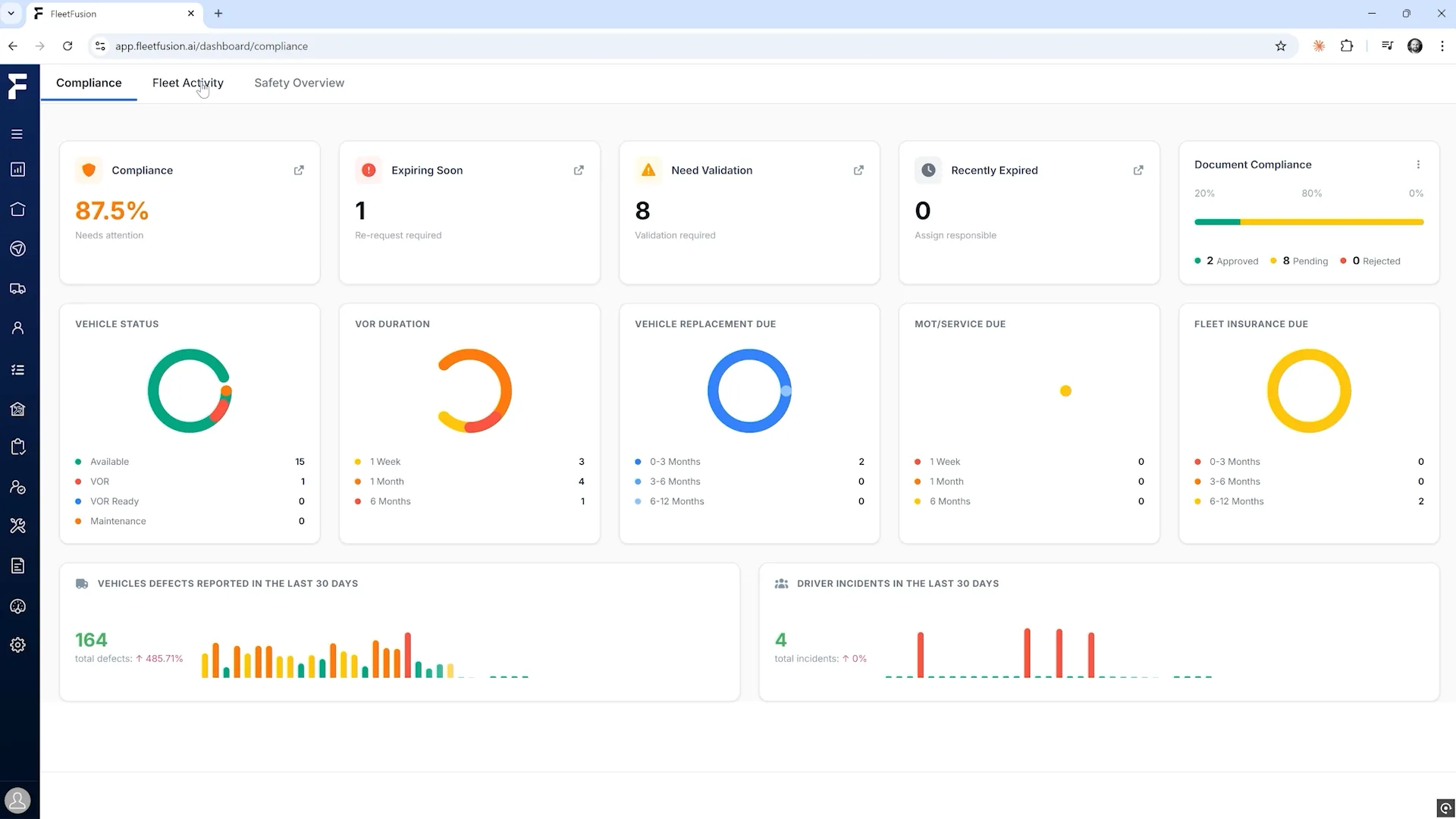
FleetFusion on a desktop: company compliance, vehicle availability, deadlines and evidence in one dashboard

FleetFusion

One shared platform, accessed in your browser. Vehicles, drivers, depots and fleets stay connected to their work and evidence.

Shared RecordsUser PermissionsFusionOracle & Miles
03 · Across Your Systems
Ford Pro logoFord Pro
Volvo logoVolvo
Scania logoScania
Samsara logoSamsara
Geotab logoGeotab
Webfleet logoWebfleet

Your Connected Services

Vehicle and telematics data, plus ERP orders and company documents through supported connections.

Explore All Integrations →
The desktop represents your team's view of the shared FleetFusion platform. Available information and the direction of data exchange depend on each connected service, configuration and permissions.
API Integration

Keep Your Providers. Connect The Information.

A connected platform makes the data useful in the context of your business. Link incoming information to the right vehicle, driver, depot or fleet, so teams can investigate an issue without rebuilding the story across separate systems.

Vehicle Data With Context

Bring supported tracking, fuel and vehicle health data into the records your team already uses. Scania connectivity includes live tracking, tire pressure, fault codes, connected trailer ID and weight, fuel and tachograph data.

Orders And Company Knowledge

ERP connections can feed the RouteFusion order pipeline. Connected document stores add company knowledge for FusionOracle to use alongside operational data when preparing analysis and insights.

The Right View For Each User

Keep access aligned with user roles and organizational scope. Drivers contribute through the app, local teams manage their areas, and authorized managers can review the wider operation. Miles works with the information the user is permitted to access.

How It Works In Practice

Your Structure Determines Who Manages What.

A depot tells you where the operation is based. A fleet groups the vehicles doing the work. A cost center gives spending a business owner. Keeping those relationships together makes it easier to move from a company-wide view to the people and records that need attention.

Information Becomes Action

  1. Organization
  2. Cost Center / Depot / Fleet
  3. Vehicles / Drivers / Assets
  4. Requirements & Evidence
Follow the information through the workflow. Each step keeps the context for the next person.

Organize The Operation

Set up cost centers, depots and fleets before importing vehicles and drivers. Use the depot view to review its fleet breakdown, vehicle availability, defect counts and driver compliance.

Define Types Once

Attach requirements to vehicle and driver types. Individual records inherit the relevant requirements, with validity dates and supporting evidence tracked against each submission.

Give Teams Appropriate Access

Configure user roles and permissions around responsibilities. Vehicle assignments retain their start and end dates, so a handover does not erase the history of who drove what.

Keep Exploring FleetFusion

Make The Connected Platform Work For Your Team.

Explore the provider connections and onboarding steps that bring your existing records into FleetFusion.