
Capture The Refuel
Use supported fuel-card feeds or driver app records to account for fuel added to the vehicle.
Control costs
FleetFusion manages fuel transactions and automates fuel cards, then compares them with live vehicle data so you get accurate MPG and early warning of fuel fraud.
Bring fuel use, estimated cost, average economy, emissions and idling into one dashboard. Follow the trend over time and compare the current period with the previous one to understand where performance is changing.

Bring supported fuel-card transactions into FleetFusion and match them to vehicle records. Review purchases alongside available fuel and usage data to investigate differences and keep the cost history connected to the fleet.
Combine fuel-card transactions or fill-ups recorded in the driver app with the vehicle’s known tank capacity and AI-predicted consumption. CanFusion accounts for full and partial refuels, then follows ongoing vehicle use to flag discrepancies and possible fuel fraud—even with a basic tracker and no CAN bus connection.
Use supported fuel-card feeds or driver app records to account for fuel added to the vehicle.
Use known capacity, full or partial fills and predicted consumption to estimate the ongoing fuel position.
Review purchases and vehicle activity when the expected balance or refuelling pattern does not add up.
Fuel, AdBlue and tyre pressure data stream to the office from connected vehicles, and tyre management schedules inspections and analyses tyre performance.
FusionOracle maps today’s diesel prices against past cycles, helping you decide which routes and contracts need a fuel-surcharge review.
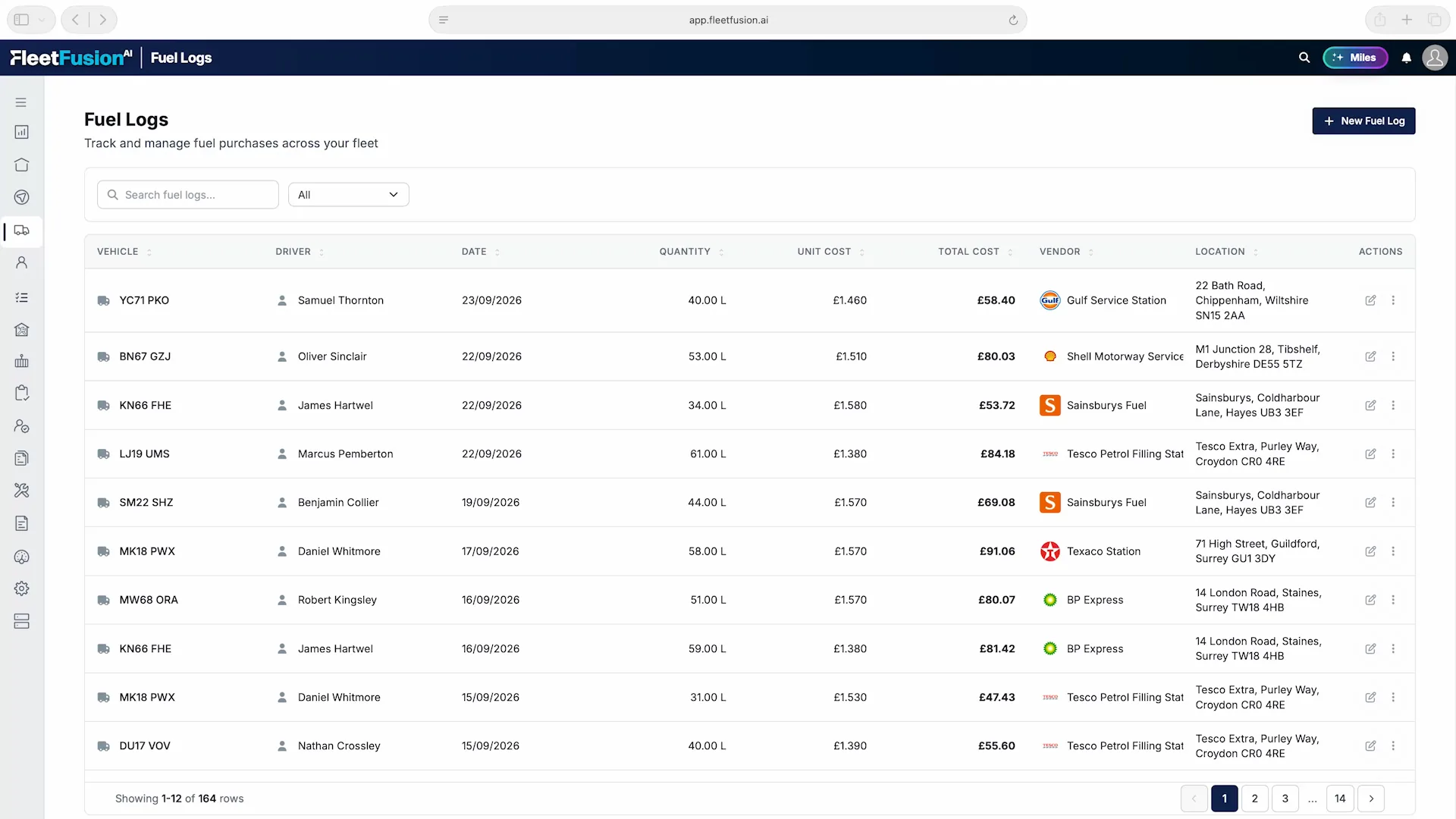
Keep fuel quantity, unit cost, total cost and supplier with the vehicle, driver and purchase date. A clear transaction history helps the office check spending and investigate a purchase without searching through separate records.
When fuel spend rises, the useful question is where to investigate. FleetFusion records the vehicle, driver, date, quantity, unit price, vendor and location, giving the fleet office and finance team a common transaction record.
Information Becomes Action
Record quantity and unit cost; the total is calculated automatically. The driver and vehicle provide context for each purchase, including entries captured through the driver app.
Search by registration, driver, vendor or location and filter by fuel type. Check unusual purchases against the vehicle’s activity before deciding what needs follow-up.
Use fuel reporting for regular analysis and schedule delivery to the team that owns the cost. Keep measured vehicle data and CanFusion predictions clearly identified when comparing consumption.
Fleet activity places fuel spend beside mileage, utilization and idle time.
Open the screenshot to explore the details at full size.

Live GPS fleet tracking with 24-hour activity bars, trip view, geofences, points of interest and tyre, fuel and AdBlue data.
Learn more →Control costsAssign vehicles, drivers and costs to contracts with end-to-end visibility of the contract and customer life cycle, plus AI market-sector warnings.
Learn more →Decide with AIFusionOracle, FleetFusion’s LLM, predicts outcomes, surfaces early warnings, summarises competitor news and finds new commercial opportunities.
Learn more →FleetFusion connects fuel-card purchases and driver-recorded refuels with vehicle records. Where direct CAN fuel data is unavailable, CanFusion combines known tank capacity, recorded full or partial fills and predicted consumption to flag discrepancies and possible fraud for review.
Yes, from connected vehicles, along with tyre pressures.